
How to Know If a Standing Desk Is Worth It for Neck Pain
Last Updated: 26 October 2026
Quick Summary
A standing desk can help with standing desk neck pain, but only when combined with correct monitor height, proper posture habits, and regular movement breaks. The desk itself isn't a cure; it's a tool that works best as part of a complete strategy including core strength and positional changes every 45 minutes.
- Monitor height is the single biggest factor in preventing standing desk neck pain, with the top of your screen at or slightly below eye level.
- Alternating between sitting and standing every 30 to 45 minutes is better for your neck than staying in either position all day.
- Your head weighs 4.5 to 5.5 kilograms, and for every 2.5 centimetres it moves forward, the load on your neck muscles nearly doubles.
- Desk height should place your elbows at roughly 90 degrees, with your monitor positioned 50 to 70 centimetres from your eyes.
- Neck pain lasting more than two weeks or radiating into your arms and hands requires professional assessment to identify the root cause.
Table of Contents
- Does a Standing Desk Actually Help Neck Pain?
- Sitting vs Standing Desk: Which Is Better for Your Neck?
- How to Set Up a Standing Desk Ergonomically
- Monitor Height for Neck Pain: Getting It Right
- Desk Exercises for Neck Pain Relief
- Common Mistakes That Make Neck Pain Worse
- When to Seek Professional Assessment for Neck Pain
- Frequently Asked Questions
Does a Standing Desk Actually Help Neck Pain?
Standing desk neck pain won't resolve on its own without the right approach. But the right setup, combined with proper technique, can make a real difference. At Your Spinal Health, we work with office workers in Penrith who spend their days at desks. Many of them assume standing is the answer.
Standing desks shift the problem rather than solve it. When you stand poorly, your neck suffers just as much as when you sit poorly. The key isn't whether you stand or sit, it's how you do it. A standing desk is worth it for neck pain only when three conditions are met: correct monitor height, proper posture habits, and movement breaks throughout the day. Mastering these ergonomic fundamentals transforms the workspace into a tool for long-term health, while the broader benefits of standing desks extend to maintaining consistent mental clarity throughout your working hours.
Think of a standing desk as a tool, not a cure. It gives you options. It lets you change position. But without the right knowledge about how to use it, you're just trading one bad posture for another.
Sitting vs Standing Desk: Which Is Better for Your Neck?
Neither sitting nor standing is inherently better for your neck. Both can cause pain. Both can feel fine. The difference comes down to how long you hold one position and whether your setup supports neutral spine alignment.
Sitting keeps your hips and knees at 90 degrees. This is stable. But stability can become stagnation. After two hours in the same seated position, your neck begins to compensate. Your shoulders creep forward. Your head drifts ahead of your spine.
Standing changes the demand on your muscles. Your legs engage. Your core activates differently. But standing also invites new problems. Without conscious posture, standing users often shift weight to one leg, tilting the pelvis and throwing the entire spine out of alignment. Your neck follows.
The real answer: alternating between sitting and standing throughout the day is better for your neck than staying in either position all day. Movement variety reduces fatigue in any single muscle group. It prevents the repetitive strain that builds over weeks and months.
For office workers in Penrith dealing with chronic neck discomfort, a standing desk becomes valuable only when paired with a commitment to change position regularly. Every 30 to 45 minutes, switch. Sit for a while. Stand for a while. Move around. This rhythm keeps your neck from locking into compensation patterns.
How to Set Up a Standing Desk Ergonomically
Getting your standing desk right takes three adjustments: desk height, monitor position, and arm angle.
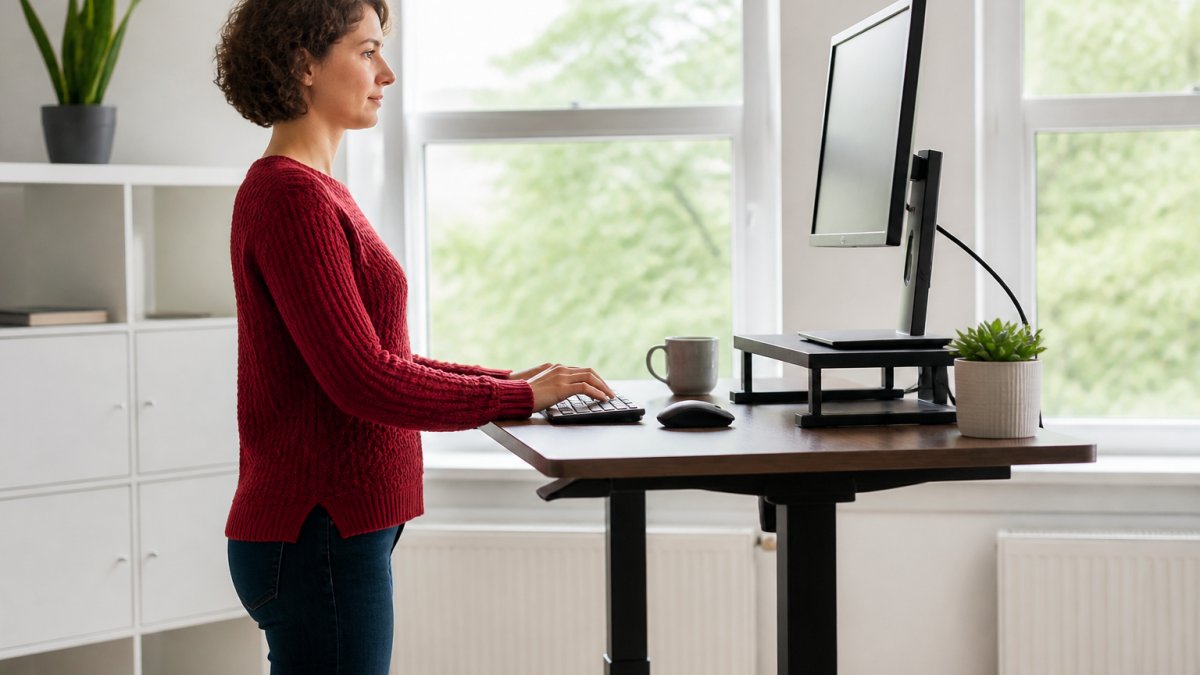
Desk height should place your elbows at roughly 90 degrees when your arms hang naturally at your sides. Your wrists should stay neutral, not bent up or down, when your hands rest on the keyboard.
Monitor placement is where most people go wrong. The top of your screen should sit at or slightly below eye level.
The monitor should also sit an arm's length away, roughly 50 to 70 centimetres from your eyes. This distance lets your eyes focus comfortably without leaning forward.
Keyboard and mouse should sit at the same height as your elbows. Your forearms should be parallel to the floor. This prevents your wrists from bending and keeps strain off your neck and shoulders.
Many people overlook a fourth element: footwear and floor surface. Standing on hard floors in unsupportive shoes creates tension that travels up your legs and into your lower back. This tension radiates into your neck.
Learn how to fix desk neck pain with practical steps and ergonomic adjustments if your current setup is causing discomfort.
Monitor Height for Neck Pain: Getting It Right
Monitor height is the single biggest factor in preventing standing desk neck pain and maintaining proper neck health. Get this wrong, and no other adjustment matters.
Your eyes should meet the screen at a neutral angle. Imagine a line drawn straight ahead from your eyes. That line should intersect the monitor somewhere in the upper third of the screen. This is the sweet spot.
When the monitor sits too low, you look down. Your chin tucks slightly. The muscles at the back of your neck lengthen under tension. Over hours, this creates fatigue and pain.
When the monitor sits too high, you tilt your head back. Your chin lifts. The front of your neck compresses.
The fix is simple: adjust your monitor height using a stand or arm. If you use a laptop, place it on a stand and use an external keyboard and mouse. Laptop screens are almost always too low for proper neck alignment.
Distance matters too. Sit roughly 50 to 70 centimetres from your monitor. This distance lets your eyes relax and your neck stay neutral. Too close, and you lean in. Too far, and you strain to read.
Desk Exercises for Neck Pain Relief
Movement breaks are non-negotiable. They interrupt the fatigue cycle that builds throughout the day.
Book Your Spinal Health Assessment →
Gentle neck rotations: Sit or stand with your shoulders relaxed. Slowly turn your head to look over your right shoulder. Hold for three to five seconds. Return to centre. Repeat on the left. Do this five times each direction.
Shoulder rolls: Roll your shoulders backward slowly, making a full circle. Do this eight times. Then roll forward eight times.
Chin tucks: Sit upright. Gently draw your chin straight back, as if making a double chin. Don't look down. Hold for two seconds. Release. Repeat ten times.
Neck stretches: Tilt your head slowly toward your right shoulder. Feel the stretch on the left side of your neck. Hold for 15 to 20 seconds. Repeat on the left side. Do this two or three times on each side.
Discover natural ways to manage chronic neck pain, including exercises and ergonomic techniques that work alongside desk setup adjustments.
These exercises take less than five minutes. Do them every two hours. They're not a replacement for movement breaks, they're part of them. Stand up, do these exercises, walk around, then return to your desk.
Common Mistakes That Make Neck Pain Worse
Mistake one: keeping your head forward. Your head weighs about 4.5 to 5.5 kilograms. When it sits directly over your spine, your neck muscles work minimally. For every 2.5 centimetres your head moves forward, the load on your neck muscles nearly doubles. This is why "tech neck", the forward head posture from looking at phones, causes so much pain.
Mistake two: ignoring lower back posture. Your neck doesn't exist in isolation. If your lower back rounds, your mid-back follows. Your upper back rounds. Your shoulders roll forward. Your neck compensates by tilting back. The whole chain breaks. Protect your lower back by engaging your core and maintaining the natural curve of your spine.
Mistake three: sitting or standing for more than 90 minutes straight. Your body isn't designed for static positions. Muscles fatigue. Joints stiffen. Discs in your spine experience uneven pressure. Change position frequently. Every 45 minutes, shift from sitting to standing or vice versa.
Mistake four: using a standing desk without strengthening your core. Standing demands more from your core muscles than sitting does. If these muscles are weak, your spine compensates. Your shoulders hunch. Your neck tenses. Spend time strengthening your core, planks, dead bugs, bird dogs, and your standing desk becomes far more comfortable.
Mistake five: assuming a standing desk is a permanent solution. A standing desk is a tool. It's not a fix. It's not a substitute for proper posture habits, movement breaks, and core strength. Treat it as one part of a larger strategy for neck health.
Several posture and desk habits commonly worsen neck pain and should be avoided.
| Mistake | Problem | Solution |
|---|---|---|
| Head positioned forward | Load on neck muscles nearly doubles for every 2.5 cm forward | Keep head directly over spine |
| Ignoring lower back posture | Entire spine chain breaks, neck compensates | Engage core and maintain natural spine curve |
| Static position over 90 minutes | Muscles fatigue, joints stiffen, discs experience uneven pressure | Change position every 45 minutes |
| Weak core whilst standing | Spine compensates, shoulders hunch, neck tenses | Strengthen core with planks and similar exercises |
| Treating standing desk as permanent solution | Standing desk alone does not fix neck pain | Combine with posture habits, movement breaks, core strength |
When to Seek Professional Assessment for Neck Pain
If neck pain persists despite ergonomic adjustments and exercise, professional assessment becomes important. Neck pain that lasts more than two weeks, worsens over time, or radiates into your arms or hands signals something that needs expert evaluation.
A qualified chiropractor can identify the root cause of your pain. Discover how chiropractic care provides lasting relief for neck pain and other conditions related to desk work. Is your pain coming from poor posture? From muscle tension?
Many people in Penrith who've had negative experiences with forceful treatment hesitate to seek help. This is understandable. But gentle, personalised assessment is different. It focuses on understanding what's actually wrong.
Book your Spinal Health Assessment if you're ready to understand what's driving your neck pain and get a clear roadmap for relief.
Watch out: if you experience sudden severe pain, numbness, tingling, weakness, or loss of coordination, seek immediate medical attention. These symptoms can indicate a serious condition requiring urgent care.
Professional assessment also helps when you're unsure whether your pain is coming from your desk setup or something deeper.
A standing desk can be worth it for neck pain, but only as part of a complete strategy. The desk itself isn't the solution. Your setup is. Your movement habits are. Your core strength is. Your awareness of posture is.
Frequently Asked Questions
Can a standing desk help with neck pain?
A standing desk can help reduce neck pain if set up correctly, but it is not a cure on its own. The key is proper ergonomics: monitor at eye level, shoulders relaxed, and regular movement between sitting and standing. Many people find that alternating positions throughout the day reduces strain better than sitting all day. However, if your neck pain stems from poor posture habits or underlying spinal issues, a standing desk alone may not resolve it without addressing the root cause.
How should I set up a standing desk to reduce neck strain?
Position your monitor so the top of the screen is at or slightly below eye level, about an arm's length away. Your elbows should bend at roughly 90 degrees, and your wrists should be neutral. Keep your shoulders relaxed, not hunched. Your feet should be flat on the floor or a footrest. Adjust the desk height so your forearms are parallel to the ground. Avoid leaning forward or tilting your head down, as this places unnecessary stress on your neck.
Is standing better than sitting for neck pain?
Neither sitting nor standing alone is ideal for neck pain relief. The best approach is alternating between both throughout the day. Prolonged sitting can cause poor posture and stiffness, while standing for too long without breaks can create fatigue and strain. Most experts suggest switching positions every 30 to 60 minutes. This variety keeps your muscles engaged, reduces repetitive stress on any one area, and helps maintain better overall spinal alignment than staying in one position all day.
When should I seek professional advice for persistent neck pain?
If your neck pain persists for more than a few weeks, worsens despite ergonomic changes, or is accompanied by numbness, tingling, headaches, or restricted movement, it is worth speaking with a qualified professional. A chiropractor or physiotherapist can assess whether your pain is related to desk posture, underlying spinal issues, or other factors. They can provide a personalised plan tailored to your specific situation rather than relying on general ergonomic advice alone.

